
Required Google Account Permissions for Spreadsheets Add-on
Last updated
Note: When using Power My Analytics' Spreadsheets Addon with Google Sheets, you'll be asked to grant certain permissions to your Google account. We understand that granting these permissions may raise concerns about data security and privacy. This guide explains why these permissions are necessary, what they mean for you, and how we use them to provide our services.
Required Permissions
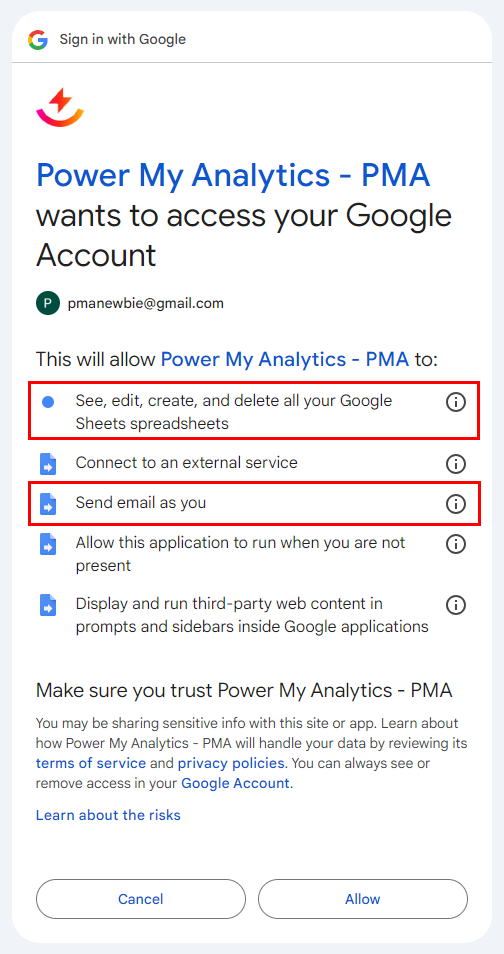
1. "See, edit, create, and delete all your Google sheets spreadsheets"
Why we need this permission:
- To access and interact with your spreadsheets as requested through our Addon.
- To perform actions like adding reports, refreshing data, and scheduling updates.
What you should know:
- Google doesn't offer more granular permission options for spreadsheets.
- We can't request "read-only" access separately from edit, create, and delete permissions.
- Power My Analytics will never edit, create, or delete your spreadsheets without your explicit action or configuration.
2. "Send email as you"
Why we need this permission:
- To send the report emails and failure alerts you set up when you schedule a refresh, such as a PDF of your reports after each scheduled refresh.
What you should know:
- These emails are sent from the Google account that saved the schedule. Report emails show the sender name "Power My Analytics" and send replies to noreply@powermyanalytics.com, unless you change them under Show advanced settings on the Schedule Refresh page.
- The add-on sends email only when you turn on Email reports after each refresh or Email an alert if a refresh fails. It never sends any other email from your Google account.
Our Commitment to Your Data
At Power My Analytics, we prioritize your data security and privacy. Here's our promise to you:
- We will only access your spreadsheets when you use our Addon or when performing actions you've explicitly configured.
- We will never edit, create, or delete spreadsheets without your direct involvement or instruction.
- We will only use the email permission to send the report emails and failure alerts you schedule.
- We continuously review and update our security practices to ensure the safety of your data.
FAQ
Q: Can I use the Addon with more limited permissions?
A: Unfortunately, due to Google's permission structure, we can't offer a more limited version of the Addon. The current permissions are necessary for full functionality.
Q: How can I revoke these permissions?
A: You can revoke permissions at any time through your Google Account settings. However, this will prevent the Addon from functioning.
Q: Who can I contact if I have more questions about data security?
A: For any concerns or questions about data security, please contact our support team.
Troubleshooting
If you continue to experience issues with allowing PMA to access your Google account and use the Spreadsheets Addon, please see the instructions at Google Account Disconnects When Using Google Workspace